
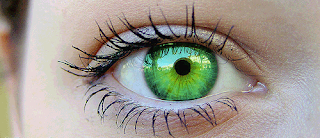
This is the Photoshop tutorial to change the color of eyes. What color of your eyes? Brown? Black? or blue... Want to change it? You can change it by following these steps using Adobe Photoshop. It's simple, easy and effective. Ready? Let's go! Wuhuu!!
First, open Adobe Photoshop and click file>open and choose your picture. Then, click to create a new layer from layer window. Click once to the new layer.

Picture 1 : Create a New Layer Icon

Picture: New Layer Have Been Created
After that, click to brush and select color to choose color that you want.

Picture 3: Brush (1) and Color (2)
Then, fill brush on the eyeball. Do it slowly. Make it perfect.

Picture 4: Fill Brush inside Eyeball
The next step is by clicking at black pointer beside 'normal' box (1) that have shown below and change it into overlay (2).

Picture 5: Set Brush to Overlay
Yes!! You almost done. What you need to now is to set percentage of the opacity. Click opacity icon and decrease the percentage by dragging it to the left. Finish!!

Picture 6: Opacity
Done! Try to pick different color and see the result... You can use gradient tool to change the color. Just click it on your eyeball. That's all.. Good luck!I hope you enjoy this photoshop tutorial.
Read more...


